GSM Prime Tool: The Ultimate Samsung FRP Unlock Solution & Samflash Tool Fix (2026)
GSM Prime Tool: The Ultimate Samsung FRP Unlock Solution & Samflash Tool Fix (2026)
 |
| GSM Prime Tool Samsung MTK FRP Tool |
In the rapidly evolving world of mobile software repair, technicians constantly face the challenge of tools becoming obsolete. For years, the Samflash Tool was a staple for every repair workstation, providing a seamless way to bypass Factory Reset Protection (FRP) on Samsung devices. However, recent security updates and server changes have rendered Samflash non-functional, leaving many professionals searching for a reliable alternative.
Today, we are taking a deep dive into the GSM Prime Tool—the most effective, free, and lightweight successor to Samflash. Whether you are dealing with MTK chipsets in Download Mode or Qualcomm models via EDL/ADB, this tool is designed to simplify your workflow.
⚠️ Professional Disclaimer & Educational Notice
Notice to Users: This detailed guide and the featured software are shared strictly for educational and professional purposes. I am not the developer, owner, or official distributor of the GSM Prime Tool. All intellectual property rights belong to the original developers. My goal is to support the technician community by sharing high-quality resources, explaining their features, and providing safe usage instructions.
Technicians must ensure they have legal permission from the device owner before performing any software modifications. Improper use of these tools can lead to data loss or device instability.
The Evolution: From Samflash Tool to GSM Prime Tool
Many of you have reached out to me via inbox asking, "Why is the Samflash Tool not working anymore?" or "How do I fix the Samflash update error?" The reality is that as Android security patches (Android 14, 15, and the upcoming 16) become more sophisticated, older tools fail to communicate with the device's bootloader.
The GSM Prime Tool solves this. It carries the same user-friendly interface as Samflash but with updated libraries that support 2024–2026 security protocols. If you loved the simplicity of Samflash, you will find GSM Prime to be a direct and more powerful replacement.
Why Every Technician Needs This Tool:
Zero Cost: Unlike Unlock Tool or Chimeratool, which require expensive yearly subscriptions, GSM Prime is completely free.
Ultra-Lightweight: The software is optimized to run on "Old Quality" PCs. You don't need a high-end processor or 32GB of RAM; it runs smoothly on basic shop laptops.
One-Click Logic: It eliminates the need for complex manual bypasses (like the Alliance Shield or Talkback methods), saving you hours of work.
Essential: Driver Installation
If the tool does not detect your phone, it is likely due to missing USB drivers. Proper communication between the PC and the mobile device is mandatory for any software work.
💡 Pro Tip: If the tool doesn't work, it's maybe because you need to install the correct drivers. This post will help you to install all necessary drivers:
👉
Key Features & Supported Models
1. Samsung MTK FRP Reset (Download Mode)
The standout feature of this tool is its ability to handle Samsung MediaTek (MTK) devices. Just like the premium "Reset Samsung FRP MTK" option in paid boxes, GSM Prime allows you to:
Connect the device in Download Mode.
Click a single button to wipe the persistent partition where Google Account data is stored.
Reboot and bypass the setup wizard instantly.
2. Supported Qualcomm Models
The tool features dedicated loaders for several popular Qualcomm Samsung models. You can perform one-click FRP removal for:
Galaxy A01 (SM-A015F), Galaxy A02s (SM-A025F), Galaxy A11 (SM-A115F), Galaxy A70 (SM-A705F), Galaxy A41 (SM-A415F), Galaxy J6 Plus (SM-J610G), Galaxy M01 (SM-M015G), Galaxy M02s (SM-M025F), Galaxy M11 (SM-M115F).
Alternative Free Tools for Technicians
In our line of work, having a backup tool is essential. If you are looking for more versatility or support for other brands:
For Infinix, Tecno, and itel: If you need a 1-click FRP tool for these brands, check this out: 👉
Download Samfirm AIO V1.4.3 - Best FRP Tool Best All-Rounder Free Tool: If you need the absolute best free tool available right now, try this: 👉
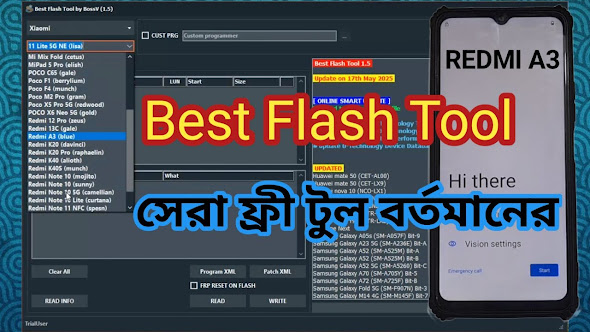
Introducing BFT (Best Flash Tool) Free Version
How to Install and Use (Step-by-Step)
Step 1: Preparing Your Environment
Before downloading, temporarily disable your Antivirus or Windows Defender.
Technician Tip: Anti-malware engines often flag repair tools as "Generic Trojans" because these tools use scripts to access system partitions. This is a false positive.
Step 2: Extraction Process
Download the GSM Prime Tool.zip.
Extract the initial zip file. Inside, you will see a text file and another archive:
gsmprime.rar.Extract
gsmprime.rar. When the password prompt appears, type:Password:RSL Mobile Solution
Step 3: Running the Tool
Navigate to the extracted folder and find gsmprime.exe. Right-click and select "Run as Administrator".
Conclusion
The GSM Prime Tool is a lifesaver for technicians who need a quick and free solution for Samsung FRP. It bridges the gap left by the old Samflash tool and provides a premium experience at zero cost.
Download GSM Prime Tool
RAR Password: RSL Mobile SolutionIf you found this guide helpful, please share it with your community. Allah Hafez!